 DuDu
DuDu
Handle channel messages with the conversation context in view.
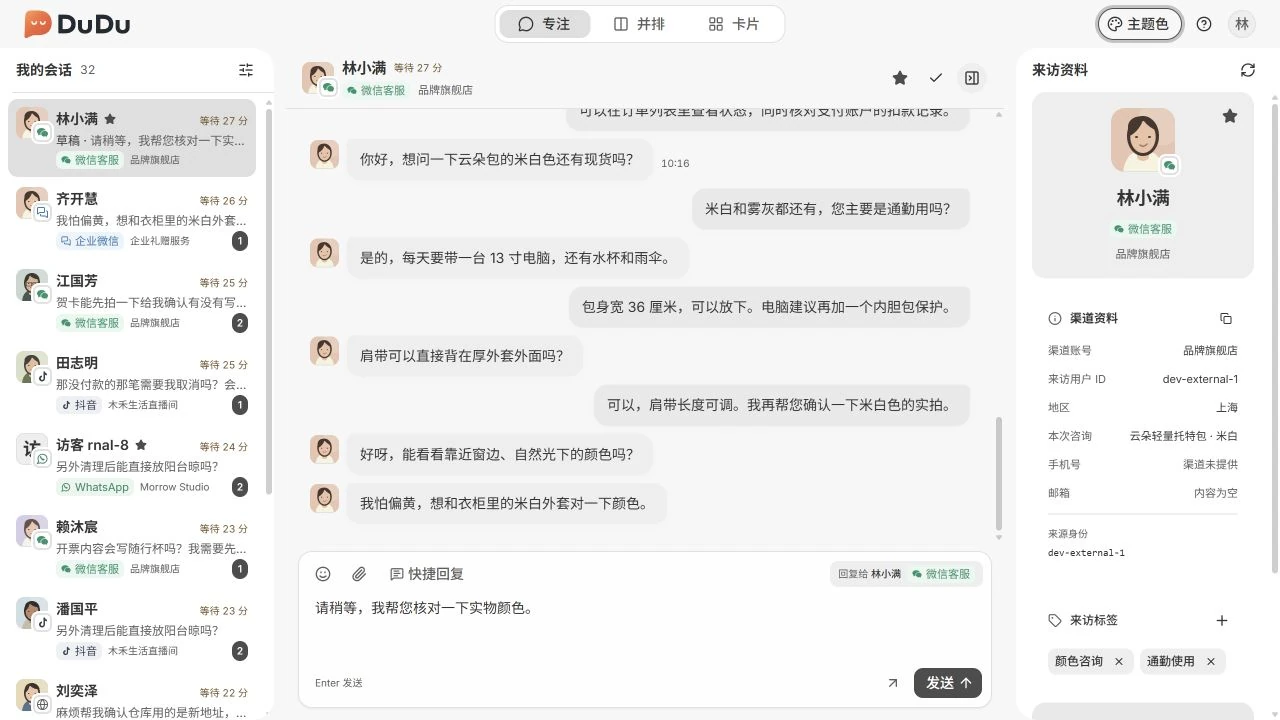
For support agents handling daily conversations: review history, reply and maintain visitor details in one workspace. Use a browser or build the desktop app.
Key capabilities
Unified conversations
Review channel conversations within your scope and use search and filters to find messages.
Three workspace layouts
Focused, side-by-side and card layouts share conversation data and drafts.
Messages and replies
Read history and incoming messages, send plain-text replies and review send results.
Shared visitor details
Maintain visitor tags and internal notes shared with authorized staff.
How it works
- Sign in as an organization employee to access conversations allowed by your groups.
- Choose a conversation, review its history and send a reply.
- Maintain tags and internal notes, then close or continue the conversation.
Requirements and scope
Outbound replies currently support plain text only. Incoming non-text messages and media retrieval depend on channel capabilities and credentials.
The modules work together: Admin provisions organizations, Console configures teams and channels, Desk handles conversations, and Server provides shared services. MockPulse is an optional development tool.